4 guides
PowerRecorder will not turn on
- Slide the hold switch to its open position and check the screen for the lock symbol.
- Check the two cells against the marks in the lower chassis. Close the battery tray fully.
- Hold the power key for two seconds and look for the startup meter.
RecordingNo level on the input meter
- Choose INPUT on the front panel and select the microphone pair.
- Speak towards the grille and turn the gain dial until both meters respond.
- If one meter stays flat, return the balance control to centre and test again.
MonitoringA hiss in the headphones
- Make a short recording in a quiet space. Play it back at a comfortable level.
- If the recording is clean, reseat the headphone plug and lower the monitor level.
- If the hiss was recorded, reduce input gain and move the recorder closer to the source.
FilesFind a take on the memory card
- Stop the current take before opening the file browser.
- Open TAKES, choose the session folder and select the highest numbered WAV file.
- Use the playback key to confirm the take before transferring the card.
No matching guides.
Field hardware / portable audio
F2 assembly.
Select a numbered callout to inspect the assembly.
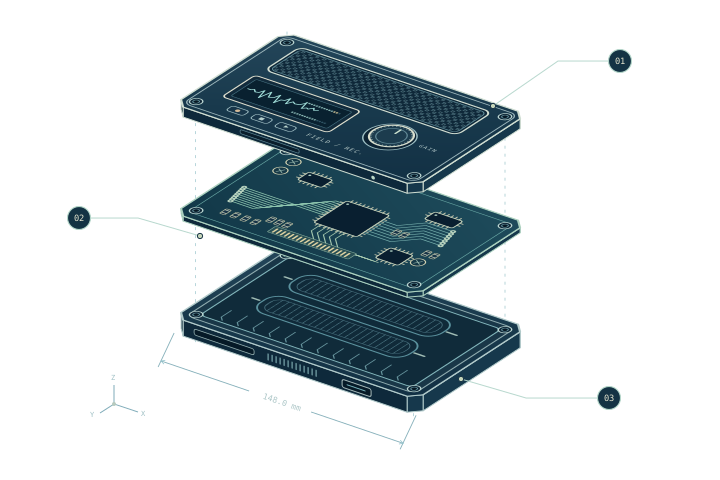
PART / 01
Anodised aluminium
Perforated upper shell
Four countersunk fasteners hold the grille clear of the two microphones. The opening above the display stays flush with the face.
PART / 02
FR-4 / copper
Dual-input signal board
The rotary encoder sits beside the display connector. The board lifts straight upwards once its two connectors are free.
PART / 03
Milled aluminium
Gasketed lower chassis
The battery tray fits into the raised cradle. A continuous gasket follows the lip where the two halves meet.
Bench manual / Sheet 02
Signal path
- 01 / InputThe microphone pair feeds the front end through two isolated paths.
- 02 / CaptureA matched gain stage preserves the left and right channels separately.
- 03 / MonitorThe encoder sets the level at the headphone output.